Use bpi-m64
I picked up a Banana Pi M64 and wanted to get it running with Armbian and see what the hardware could do. This is the path I took: flashing the image, first boot, getting a console over UART or SSH, and a small CPU benchmark at the end. When I got stuck, the Armbian documentation and forum were where I looked.
Download and flash to an SD card
I used the CLI (command line) version of Armbian and downloaded the image from the Armbian bpi-m64 page:
wget https://dl.armbian.com/bananapim64/Debian_stretch_next.7z
First I installed p7zip:
sudo apt update && sudo apt install p7zip
Then I found my SD card and unmounted its partitions (blkid helped me identify the right device), and wrote the image straight from the archive with 7-Zip piped into dd:
sudo umount /dev/mmcblk0p*
sudo 7za x Debian_stretch_next.7z -so | sudo dd of=/dev/mmcblk0 bs=4M
Boot
After I inserted the SD card and powered the board, it started to boot. The bpi-m64 has three small RGB LEDs; only the red one lights up, and after a few seconds the network LED starts to blink.
Configure over UART
You can reach the board over a serial console (UART over USB) — see bpi-m64 management with UART and USB — or over the network with SSH.
Configure over SSH
To reach it over SSH I first scanned my network with nmap to find the new board:
sudo nmap -sn 192.168.0.0/24
I was not sure which host was the new one, so I scanned the candidate more closely (and could just as well have tried SSH on port 22 directly):
sudo nmap -A 192.168.0.100


Starting Nmap 7.40 ( https://nmap.org ) at 2018-05-14 17:04 CEST
Nmap scan report for 192.168.0.100
Host is up (0.00021s latency).
Not shown: 999 closed ports
PORT   STATE SERVICE VERSION
22/tcp open  ssh     OpenSSH 7.4p1 Debian 10+deb9u2 (protocol 2.0)
| ssh-hostkey:
|   2048 ... (RSA)
|_  256 ... (ECDSA)
Service Info: OS: Linux; CPE: cpe:/o:linux:linux_kernel

Service detection performed. Please report any incorrect results at https://nmap.org/submit/ .
Nmap done: 1 IP address (1 host up) scanned in 0.82 seconds
The board is reachable on SSH port 22. The default Armbian root password is 1234 (you are prompted to change it on first login):
ssh -p 22 root@192.168.0.100


The authenticity of host '192.168.0.100 (192.168.0.100)' can't be established.
ECDSA key fingerprint is SHA256:...
Are you sure you want to continue connecting (yes/no)? yes
Warning: Permanently added '192.168.0.100' (ECDSA) to the list of known hosts.
root@192.168.0.100's password:
On first start you see the hardware information, and you are required to change the root password.
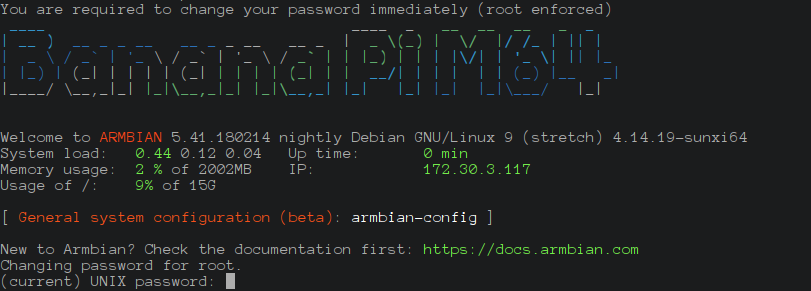
Warning
Unfortunately the board is not officially supported by Armbian. This is because the maintainer of the bpi-m64 is not that accurate with information about their products. Nevertheless, the developers at Armbian work hard on getting these boards to run. So why not donate to them if you get something out of your board? You can donate to Armbian directly on their site.
A quick CPU benchmark
Before benchmarking, I updated the system:
apt update && apt -y upgrade
Then I ran a single-threaded CPU benchmark with sysbench:
sysbench --test=cpu --cpu-max-prime=20000 run


sysbench 0.4.12:  multi-threaded system evaluation benchmark

Running the test with following options:
Number of threads: 1

Doing CPU performance benchmark

Threads started!
Done.

Maximum prime number checked in CPU test: 20000


Test execution summary:
  total time:                          44.4469s
  total number of events:              10000
  total time taken by event execution: 44.4350
  per-request statistics:
      min:                                  4.44ms
      avg:                                  4.44ms
      max:                                  4.62ms
      approx.  95 percentile:               4.45ms

Threads fairness:
  events (avg/stddev):           10000.0000/0.00
  execution time (avg/stddev):   44.4350/0.00